Find an event in the app
Find an event in the app
In the DistantRace app, challenges can only be found if you have a challenge QR code or a challenge code.
For installation, QR login, and other scanner uses, see Finding and joining events in the Mobile app section.
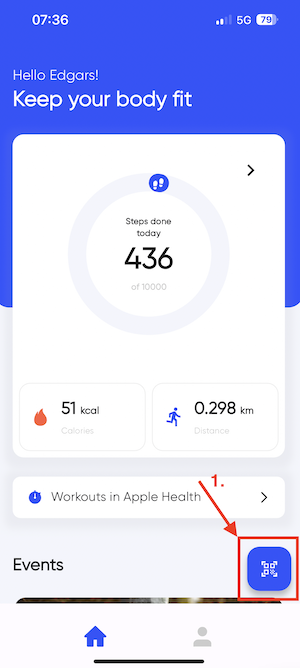
- Look for a blue button with a QR code icon at the bottom right corner of the app's home screen.
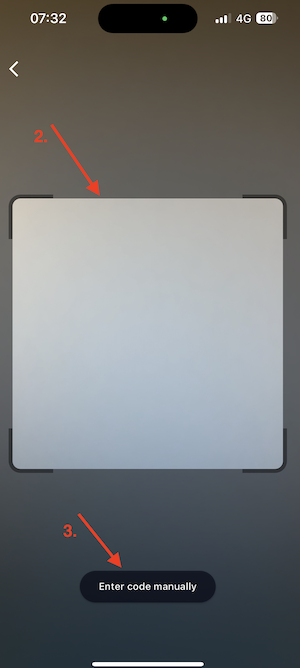
- A screen will open where you can scan the challenge QR code. Scan it, and you'll be directed to the challenge registration screen.
- If you don't want to or can't scan the QR code, for example, if the QR code is in your phone's web browser, tap "Enter code manually."
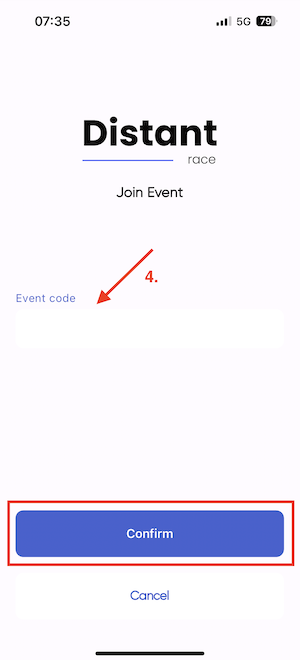
- A screen will open where you can enter the challenge code. Enter it, and you'll be directed to the challenge registration screen.
Was this page helpful?
Thanks — your feedback helps us improve these docs.